Eleven days on hold for their signature. Logged as your delay.
Dwell shows who every unit is waiting on, customer, supplier or you, chases the approval on weekdays, and hands you the record when the argument starts.
The unit sat on your shelf for eleven days because the customer had not approved the quote. Their clock ran the whole time. You got the complaint.
No customer login
One link in an email. Approve or query. Nothing to install.
Weekdays only
Day 2, day 5, second contact on day 10. Never on a Saturday or Sunday.
A log nobody can edit
Append-only and hash-chained. The database refuses edits, including from us.
Hosted in the EU
Three-year retention by default. Erasure on request.
01 / How it works
One unit, from teardown to approval.
Nothing for the customer to install. Nothing for you to remember to chase.
Illustration. A fuel boost pump comes apart along its centreline and the worn impeller is marked as the finding. A status chip then counts the days on hold from 0 to 11. It turns red after day 7 and green when the customer approves on day 11.
01Quote
You tear the unit down, find the damage and send the quote through Dwell. One link for the customer, no login.
02Hold
The unit goes on the shelf with a status that counts. Anyone can see how long it has waited, and on whom.
03Chase
Dwell reminds the contact on day 2 and day 5, then the second contact on day 10. Never on a Saturday or Sunday.
04Prove
They approve on the link. Name, time and every step before it are on the record, and the turnaround clock starts.
Day 0 sent. Day 1 viewed. Day 2 reminder. Day 5 fell on a Saturday, so it was held. Day 7 reminder. Day 10 escalated. Day 11 approved.
02 / The product
Every unit says where it is and who it is waiting on.
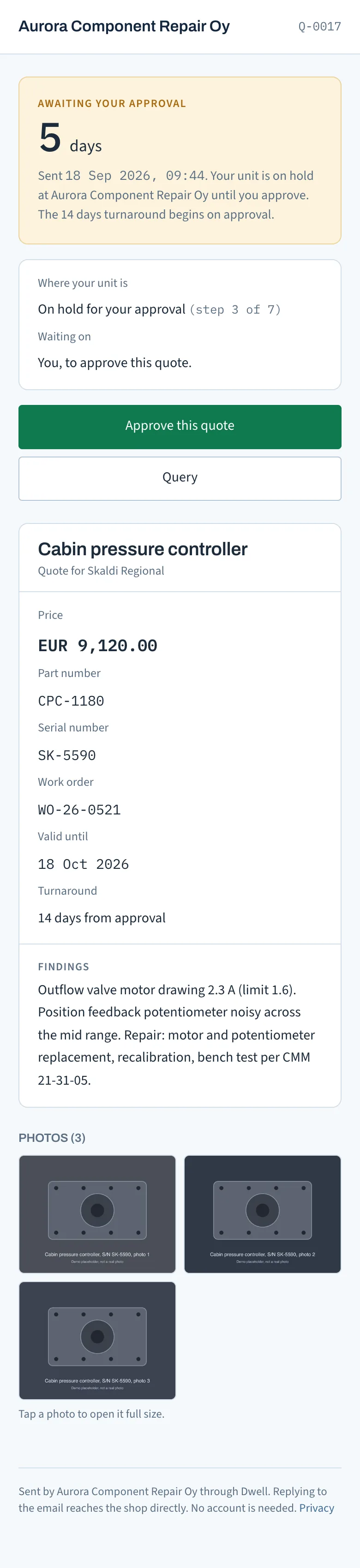
How long the unit has been on hold and whose time it was: the customer's, a supplier's or yours. Which of seven stages it is in, from received to shipped. The same facts on the unit page, on the dashboard, on the customer's link and in the PDF.
Quote Q-0007Example data
The app's own screens, captured with example data for a fictional shop.
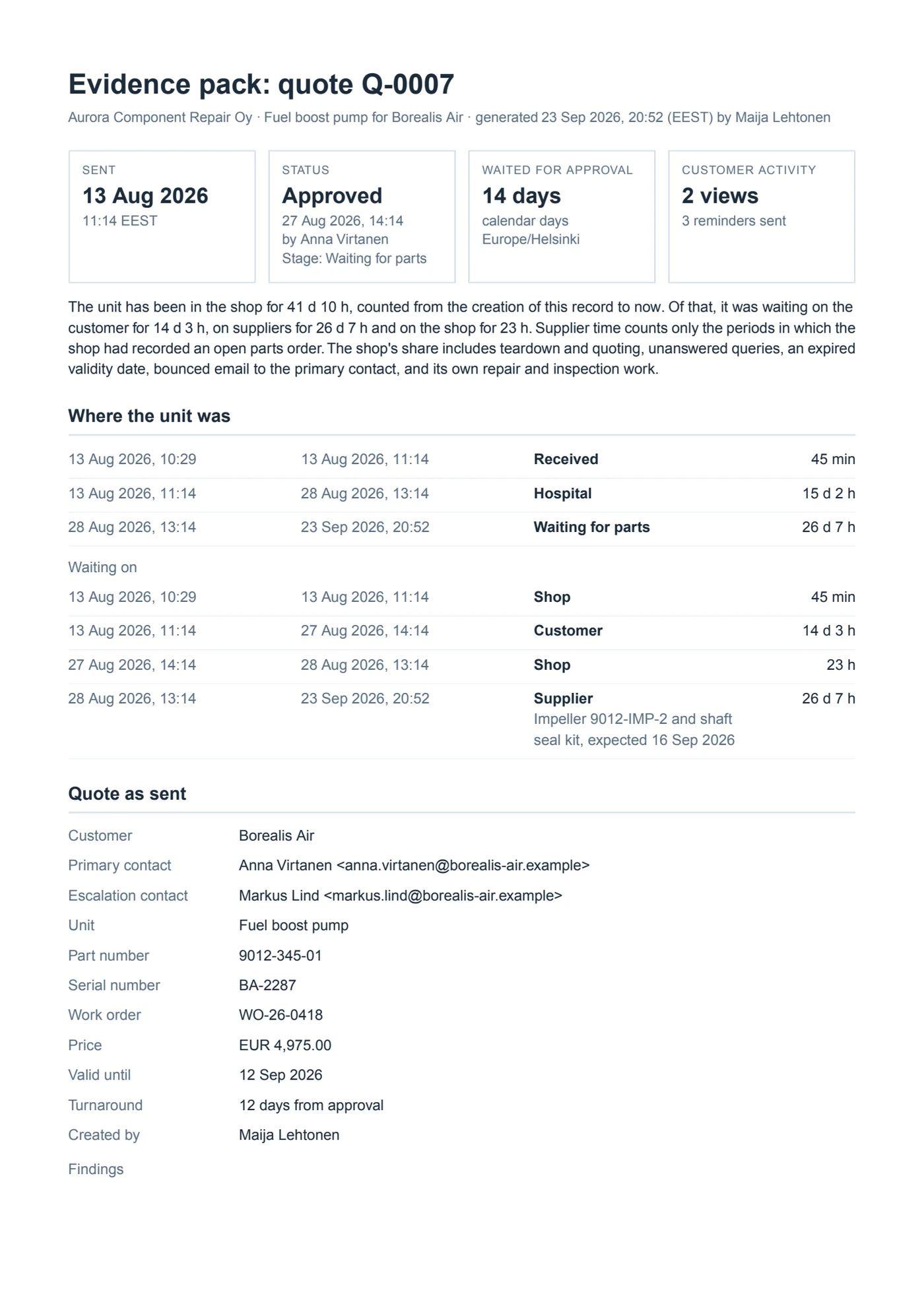
Page one of a real evidence pack, generated by the app from its demo shop. The names in it are fictional.
03 / The record
When the argument starts, hand over the record.
One click makes a PDF of everything that happened to a quote, in order, with times and who acted.
Who was waiting on whom
It states how long the quote waited on the customer and how long on you.
Nothing can be edited
Events are append-only and chained with hashes. The pack says whether the chain verified.
Weekends shown honestly
A reminder that fell on a Saturday is shown held to Monday, so the schedule reads as it ran.
04 / Pricing
One price, published in full.
€490 per site, per month, plus VAT where it applies. Unlimited users. No cap on quotes. 14-day free trial, no card.
A site is one workshop address. A group running three workshops pays for three.
€490per site, per month
Everything included
Every quote tracked, with the dwell counter running
Customer view with no login: one link, approve or query
Reminders on weekdays only, and a second contact on day 10
Append-only, hash-chained record
Evidence pack PDF on any quote
Dashboard and reports
Hosted in the EU, three-year retention by default
Not built yet: multi-site rollup, ERP export, SLA reporting. Listed so the price list is complete.
05 / Questions
What shops ask first.
Does my customer need an account?
No. They get an email from your shop with a link. It opens the quote, findings and photos, and offers two actions: approve or query. Approval captures their name, email and the time.
Does this replace my ERP?
No. It sits alongside it and tracks the one stretch your ERP is blind to: quote sent to quote approved. Quotes carry your work order reference so the two line up.
What if my customer never clicks?
You still get the reminders and the trail. Dwell reminds the contact on your schedule, escalates to the second contact, and records every send and delivery confirmation. The record shows what was sent, to whom, when, and that it went unanswered.
The sooner they sign, the sooner it flies.
Sign-up is by invitation. Leave your details, Oliver sets up your shop by hand and sends you a sign-in link. Your fourteen days start that day.