
Dwell / Quote approval
Your customer approves the repair quote from one link.
Dwell is quote approval tracking for Part-145 component repair shops. You send the repair quote through Dwell, and your customer gets an email from your shop with one link. It opens the quote, the findings and the photos, and offers two actions: approve or query. No account, no password, nothing to install.
01 / The gap
The stretch your ERP cannot see.
You tear the unit down, find the damage and write the quote. Then the unit goes on the shelf until the customer says yes. Your ERP knows the work order, but it is blind to the stretch from quote sent to quote approved. That is where the days go, and where the argument starts later.
Dwell tracks that one stretch. Every quote shows how long it has waited and who it is waiting on: the customer, a supplier or you. Quotes carry your work order reference, so the two systems line up.
- Sent
- The quote email goes out under your shop's name, and its delivery confirmation is recorded.
- Viewed
- When the customer opens the link, the view is recorded with the time.
- Reminded
- If nobody answers, Dwell reminds them on weekdays and records each send.
- Approved or queried
- Who acted, what they did and when. The counter stops on approval.
02 / The customer's side
What the customer sees on the link.
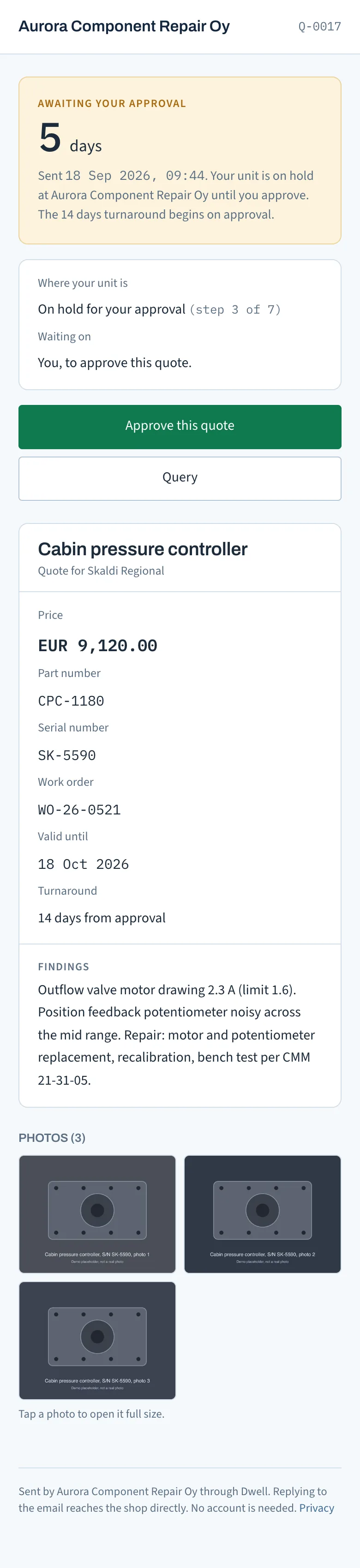
A page with your shop's name and the quote number at the top, and a counter showing how many days the quote has been awaiting their approval. It works on a phone or a desktop.
- The quote itself
- Price, part number and serial number, your work order reference, the date the quote is valid until, and the turnaround from approval.
- Findings and photos
- What you found at teardown and inspection, with your photos. A tap opens each photo full size.
- Where the unit is
- Which of the seven stages it is in, and who it is waiting on. While the quote is out, that is them.
- Two buttons
- Approve this quote, or Query. Replying to the email also reaches your shop directly.
03 / The approval
What an approval puts on the record.
Approving takes two taps: the button, then a confirmation with their name and email already filled in. The approval goes on the record, and the record cannot be edited.
- Name, email and time
- The approval captures who approved, their email address and the moment they did it.
- The terms as approved
- The price, the validity date and the turnaround are stored with the approval, as they stood at that moment.
- A confirmation both ways
- The approver gets a confirmation email. Your shop gets an email saying who approved and how many days the quote waited.
- The turnaround clock starts
- The turnaround on the quote runs from approval. Every step before it stays on the record.
- Nobody can edit it
- Events are append-only and chained with hashes. The database refuses edits, including from us.
04 / Queries
When the customer has a question first.
Not every quote gets a yes on the first read. The customer presses Query, writes what is holding the approval up and sends it to your shop. Your team gets the message by email and on the quote page.
While a query is open, the automatic reminders pause and the unit shows as waiting on you. You reply in Dwell, and the customer gets your answer by email and on the quote page. When you reply, you choose whether the reminders start again from that day.
- Does my customer need an account?
- No. They get an email from your shop with one link. It opens the quote on a phone or a desktop. There is no customer portal, no password and nothing to install.
- Can someone else at the customer approve?
- Yes, if you name them. Each quote can have a second contact. With the default schedule, if the first contact has not approved by day 10, Dwell sends the second contact their own link, and they can approve or query the quote themselves.
- Does this replace my ERP?
- No. It sits alongside it and tracks the one stretch your ERP is blind to: quote sent to quote approved. Quotes carry your work order reference so the two line up.
- What if my customer never opens the link?
- Dwell reminds them on weekdays and records every send and delivery confirmation. The record shows what was sent, to whom, when, and that it went unanswered.
Get started
Send your next repair quote through Dwell.
Sign-up is by invitation. Leave your details on the Dwell page and Oliver sets up your shop by hand. 14-day free trial, no card. After that, €490 per site, per month, plus VAT where it applies, with unlimited users and no cap on quotes.